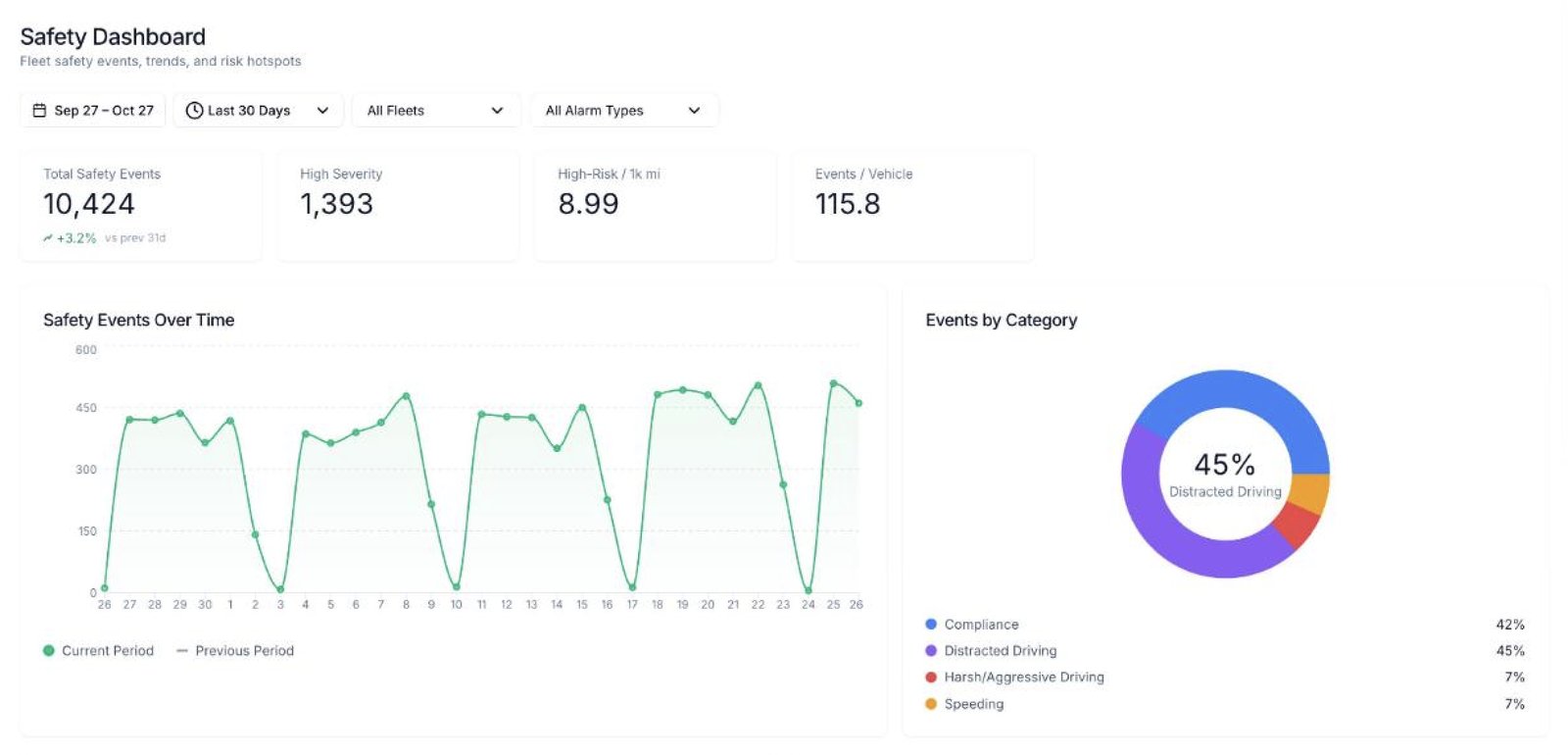
Driver risk scoring turns the safety events your cameras detect (phone use, distraction, following too closely, lane departures, missing seatbelts) into one score per driver, weighted by how serious each behavior is. Fleets use the score to see which drivers need coaching first, to coach with video instead of opinions, and to show insurers documented proof that driving behavior is improving.
Key takeaways
- A risk score is built from real ADAS and DMS camera events, weighted by severity, not from a once-a-year ride-along.
- Past behavior predicts future crashes: ATRI found a prior crash raises the odds of another by 113%.
- A documented score trend, backed by video and coaching records, is what insurers want to see at renewal.
What is driver risk scoring?
A driver risk score is a running grade of how safely someone drives, built from real events rather than from a once-a-year ride-along or a motor vehicle record check.
In SV-Cloud, S-Vision's fleet intelligence platform, every driver gets a risk profile. Each type of infraction is weighted by severity and rolled into an individual score over a time window the fleet chooses. A driver who has one hard following-distance alert in a month scores very differently from a driver who picks up the phone every afternoon.
The point is not the number itself. It's that the number is consistent, it's based on what actually happened on the road, and every flag links to a video clip that shows it.
Why does past driving behavior predict future crashes?
Because the same habits tend to show up again. Research from the American Transportation Research Institute (ATRI), based on more than 580,000 truck driver records, found that simply having a previous crash increased a driver's probability of a future crash by 113%. ATRI also found that reckless driving, improper signaling, failure to yield and improper or erratic lane changes were consistently strong predictors of future crashes.
Those findings come from violations and convictions, which only appear after something has already gone wrong. Camera-based scoring catches the same kinds of behavior earlier, every time it happens, before it turns into a ticket or a claim.
Distraction is a clear example. According to NHTSA, 3,208 people were killed in crashes involving distracted drivers in 2024. A risk score that weights phone use and eyes-off-road events heavily puts that risk in front of managers every week instead of after a crash.
“It's my opinion that distraction and erratic lane changes are strong early warning signs that a driver is heading toward a future crash.”
Barry Saunders, President, S-Vision
What does a driver risk score measure?
The score is built from the events the S-Vision AI dash cam detects. Its road-facing lens runs ADAS (advanced driver assistance) and its driver-facing lens runs DMS (driver monitoring) at the same time. Fleet managers set the severity for each event type in SV-Cloud. (For more on how the two work together, see our post ADAS vs. DMS: How AI Dash Cams Stop Crashes Before They Happen.)
| Behavior | Detected by | Why it matters for risk |
|---|---|---|
| Handheld phone use | DMS (driver-facing) | Eyes and hands off the driving task |
| Distraction (head pose and gaze) | DMS | Inattention at the moment a hazard appears |
| Fatigue and drowsiness | DMS | Yawning and microsleep patterns slow reaction time |
| No seatbelt | DMS | Raises injury severity when a crash does happen |
| Following too closely (headway) | ADAS (road-facing) | Leaves no room to stop |
| Forward collision warning | ADAS | Closing too fast on the vehicle ahead |
| Lane departure | ADAS | Drifting without signaling |
| Stop sign and speed limit violations | ADAS | Rolling stops and speeding past posted limits |
| Smoking and camera tampering | DMS | Policy compliance, and a covered lens hides everything else |
Because thresholds are configurable, a fleet can decide that a phone-use event counts far more than a single lane departure, and it only gets alerted on the behaviors that matter most to its operation. Alerts go out by email, SMS or in-app.
“Clients are able to set up scoring and place different weights on different events, so it is customized to each client's specifications. Each event type gets a number between 1 and 5, with 5 being the most severe. Once severity is set, drivers are ranked on a scale of 0 to 100, with 100 being a perfect safety score.”
Barry Saunders, President, S-Vision
How do fleets use risk scores day to day?
A score is only useful if it changes what managers do. Here's how fleets typically put it to work:
- Rank the fleet. Sort drivers by risk score and start with the highest.
- Review the video. Every risk flag in SV-Cloud links directly to the clip, so the manager sees exactly what happened on the road and in the cab.
- Coach with evidence. Video-backed coaching sessions replace “he said, she said” with documented facts.
- Track the trend. Watch individual scores and fleet-wide behavior over time to see whether coaching is working.
- Recognize improvement. Drivers whose scores improve should hear about it. Scoring works best when it's seen as fair, not just as discipline.
Real-time alerts help between coaching sessions. The dash cam warns the driver in the cab the moment a risky behavior starts, and the optional S-Watch driver display adds visual and audible alerts on the windshield.
How does driver risk scoring help lower insurance costs?
Insurance is one of the costs fleets feel most directly. ATRI's latest Analysis of the Operational Costs of Trucking found that liability and cargo insurance premiums rose 3.9% in 2025, to an average of $0.11 per mile. Crashes cost even more. The Network of Employers for Traffic Safety (NETS) estimates that on-the-job crashes cost U.S. employers $35.3 billion, with an average of $55,772 per on-the-job highway crash.
Risk scoring helps on both sides of that equation:
- Fewer crashes. Coaching the highest-risk drivers first goes after the behaviors most likely to cause the next claim.
- A documented safety story. Documented improvement in driver behavior gives a fleet a compelling case to bring to its insurer at renewal. A score trend, coaching records and event counts are far more convincing than “we take safety seriously.”
- Faster claims defense. SV-Cloud video is timestamped, geotagged and available right away. When a crash isn't your driver's fault, the footage shows it.
No insurer guarantees a discount for installing cameras, and results vary by carrier and fleet. But a fleet that can show its risk is going down is in a much stronger position to negotiate.
“We have found that most of the large commercial insurers give a discounted premium for fleets that are equipped with dash cameras. Many insurers require the driver scoring data to be shared for the discount.”
Barry Saunders, President, S-Vision
What should you look for in a driver risk scoring system?
- Scores built from both road-facing (ADAS) and driver-facing (DMS) events, not just harsh braking
- Severity weights and alert thresholds you can set yourself
- Every flag linked to a video clip, so coaching is based on evidence
- Per-driver profiles and fleet-wide trends over a time window you choose
- Open integrations. SV-Cloud pulls data and video from platforms such as Geotab, Samsara and Lytx into one dashboard with a single sign-on
- Room to grow, such as side, rear and cargo views through an S-Vision MDVR or 360° surround cameras for large vehicles
For union fleets or fleets where in-cab cameras are a concern, S-Vision also offers a road-facing-only dash cam. It still scores ADAS events, but without driver-facing footage.
Frequently asked questions
What is driver risk scoring?
Driver risk scoring combines the safety events a driver triggers, such as phone use, distraction, following too closely and lane departures, into one score weighted by severity. Fleets use it to prioritize coaching and track improvement over time.
What behaviors affect a driver's risk score?
With S-Vision, the score draws on DMS events (phone use, distraction, fatigue, seatbelt use, smoking, camera tampering) and ADAS events (forward collision warnings, following distance, lane departures, stop sign and speed limit violations). Fleet managers set the severity of each event type on a 1 to 5 scale, and drivers are ranked from 0 to 100, with 100 being a perfect safety score.
Can driver risk scoring lower insurance premiums?
It can help. Many large commercial insurers offer discounted premiums to fleets equipped with dash cameras, and many require driver scoring data to be shared to qualify. No discount is guaranteed, and results depend on the insurer and the fleet.
How is video used in driver risk coaching?
Every risk flag in SV-Cloud links to a video clip, which managers use in video-backed coaching sessions with the driver. Reviewing the clips together keeps coaching objective and fair.
Does driver risk scoring work with Samsara, Lytx or Geotab?
Yes. SV-Cloud has open integrations that bring in data and video from platforms such as Geotab, Samsara and Lytx, so fleets can see everything in one dashboard with one sign-on.
See driver risk scoring on your fleet
S-Vision combines AI road and driver monitoring, per-driver risk profiles and video-backed coaching in one platform. Request a demo to see how SV-Cloud scores your drivers.
Sources
- American Transportation Research Institute, ATRI's Latest Crash Predictor Model Corroborates Strong Role of Driver Behaviors to Future Truck Crashes (October 2022)
- NHTSA, Research Note: Distracted Driving in 2024
- FleetOwner, Trucking operational costs hit record $2.336 per mile, ATRI reports (July 2026), covering ATRI's Analysis of the Operational Costs of Trucking: 2026 Update
- Automotive Fleet, Off-the-Job Crashes Account for 43% of Employers' $61.7 Billion Crash Burden (August 2026), covering the NETS report Costs of Motor Vehicle Crashes to Employers
- S-Vision, SV-Cloud Platform, AI Dash Cam, MDVR and 360° Surround